Epson P700 vs P900: When Is a 17-Inch Printer Worth It?

Choose the Epson SureColor P700 when a 13-inch printing width covers your photographs. Move to the P900 when larger sheets are a defined requirement, rather than simply an appealing possibility. Both are pigment photo printers; the larger model changes the format and supply commitment as much as the space it occupies.
As an Amazon Associate I earn from qualifying purchases.

Illustration of a fine-art printing studio; the printer is a generic design.
Quick verdict
The P700 is the more contained choice for a home photo-printing station. The P900 makes sense for photographers who regularly need the 17-inch class and are willing to buy and handle larger paper. Both use Epson's ten-colour UltraChrome PRO10 pigment system. The comparison here is based on Epson's product information and user guide, without claiming measured print-quality results.
At a glance
Choose from the finished photograph backwards
Start with the frame or portfolio, not the printer. A 13-inch-wide sheet can already become a substantial display after mounting. If your intended output fits that format, the P700's width is sufficient even when a larger printer looks more impressive in a buying guide.
The P900 is useful when the image itself must be wider. Before paying for that step, lay out the largest paper size you expect to handle. Allow room for drying, checking and storing the print as well as feeding it through the machine. The purchase has to fit the whole process, not just the closed-printer footprint.
Larger cartridges are a budgeting question
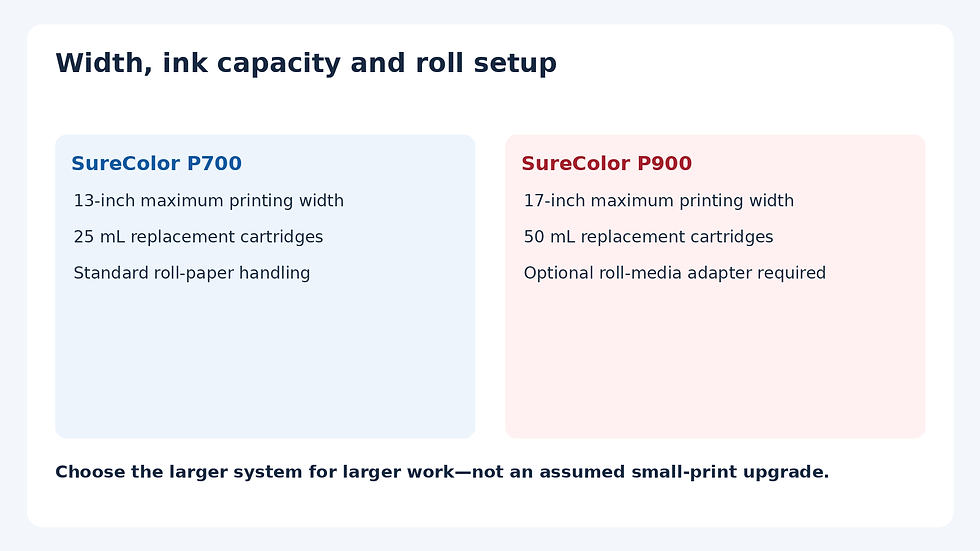
Epson lists 25 mL replacement cartridges for the P700 and 50 mL cartridges for the P900. A larger cartridge holds more ink, but the capacity number alone cannot establish your cost per photograph. Compare the current price per millilitre for the correct supplies, then consider how much of that ink your real workload will use.
Initial setup also matters. Epson explains that the included ink is used to charge the printing system, leaving less available for subsequent output than a new replacement set would imply. Keep a supply budget for setup, maintenance and printing instead of treating every millilitre in the box as finished photographs.
Roll printing has a different entry cost
Epson's loading instructions distinguish the two models: the P700 has standard roll-paper handling, while the P900 requires an optional roll-media adapter. If panoramas are the reason for upgrading, include that adapter and the suitable roll in the comparison before deciding the larger printer is affordable.
Roll capability is not a promise that any length, thickness or core size will work. Check the user guide for the specific media. Plan how you will support and handle the output, and avoid assuming the printer will automatically produce a flat, trimmed, ready-to-frame panorama with no further work.
Who should buy the P700
Buy the P700 when you want a pigment photo workflow but your intended prints fit the 13-inch class. A smaller system can leave more budget for papers, profiles and the early test prints that teach you what your photographs need.
Skip it if wider output is already a recurring job. Sending larger photographs to a lab is a perfectly sensible alternative, but buying a P700 while expecting it to replace a 17-inch device is a mismatch. Compare the actual mix of small and large prints you made recently, rather than an optimistic production forecast.
When the P900 earns its place
Choose the P900 for regular larger photographic output, with room for the associated paper and supplies. Its larger ink capacity can suit a busier workflow, but the economics still depend on current replacement prices and how the printer is used.
Skip the upgrade when the only attraction is a presumed quality improvement on the same small sheet. Both models share the documented ink family, and this article does not establish a visible winner from controlled test prints. If the difference matters to you, examine comparable sample prints on the same paper and under the same viewing light.
Final choice
The P700 is the better fit when its width meets the job. The P900 is worth considering when 17-inch output is a regular requirement and the complete paper, ink and accessory budget works. Pay for a usable format change; do not assume a larger printer automatically improves every photograph.
Sources and further reading
Related buying guide
For another decision within the 13-inch class, see Canon PRO-200S versus PRO-310.


Comments