Mini LED TVs for Hockey and Sports: What Matters Most?

Affiliate disclosure: As an Amazon Associate I earn from qualifying purchases. Gear for Greatness may receive a commission through the links below, at no additional cost to you.
Quick verdict
The best Mini LED TVs for hockey and sports need a convincing moving picture, comfortable daylight visibility and a screen that looks even during pans. A big peak-nit claim or a premium backlight label does not settle those questions.
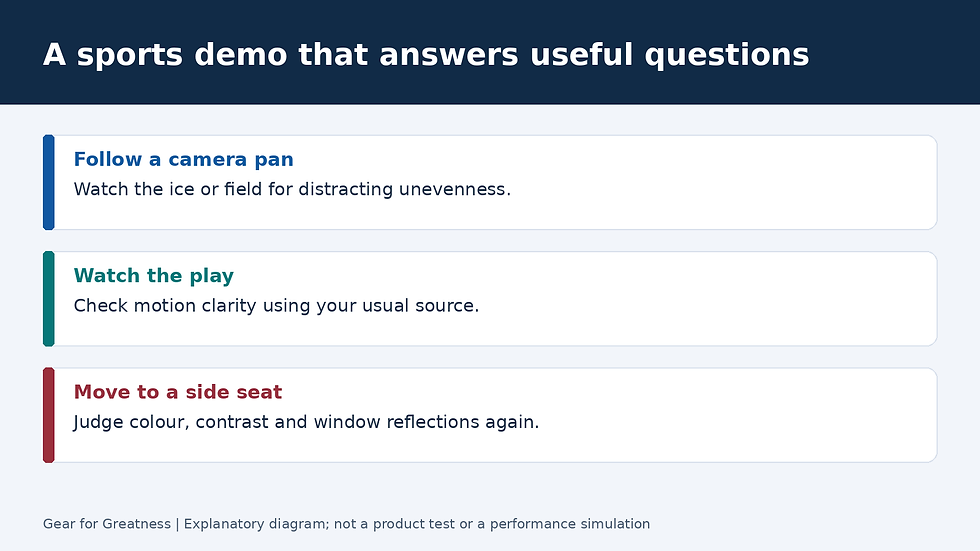
This is a research-based buying guide using the manufacturer and standards sources linked below. It does not claim hands-on testing or original performance measurements. Cover artwork is an AI-generated concept illustration of a viewing setup, not a photograph of a tested product; the separate diagram explains the buying decision.
Use actual hockey, not just a showroom highlight reel
Bring up the service or type of broadcast you normally use. A high-quality demonstration clip is useful for one purpose, but it can hide the compromises you see in live television. Compare the same feed on each candidate.
Follow the puck, players and camera pans. Then look away from the action and examine the ice itself. You are checking for distracting patches or bands that remain fixed relative to the screen as the camera moves, rather than assuming every irregularity comes from the panel.
Separate source blur from television behaviour
Sony notes that LCD response time is one contributor to motion appearance, and TCL explains that source quality and processing settings also matter. A more expensive backlight cannot recreate every detail missing from a compressed or blurred source.
Try motion settings conservatively. Strong smoothing may make movement look easier to follow, but examine the edges of players, sticks and score graphics for unwanted artefacts. The comfortable setting for hockey may differ from the one you prefer for a film.
Native refresh rate is one part of the purchase
Check the native panel refresh rate separately from a marketing motion index. Also distinguish what the panel can refresh from the frame rate supplied by your broadcast or app. A higher panel rate does not turn every programme into genuinely high-frame-rate footage.
For a mixed sports and gaming household, confirm the actual input modes as well. A feature that works for an external console may not describe the behaviour of an internal streaming app. Read the exact model’s documentation instead of applying a family-wide assumption.
Daylight and side seating can change the winner
Look at the screen from every regularly used chair. A fine central-seat picture does not establish what a wide group sees. Ask to see the television with room lighting closer to your own instead of judging only in a dark demonstration area.
Reflections deserve a separate check. Try moving a lamp or changing the viewing angle during a demonstration if the retailer permits it. In your home, curtains or a different screen position can sometimes address the interruption more directly than a higher brightness rating.
Who should buy and who should skip the flagship
Pay more if the premium set visibly improves motion, reflection handling or your side-seat experience with the sports you watch. If both candidates look similarly good, size and total cost can reasonably decide the purchase.
Skip a flagship chosen only for HDR colour claims when live sports are your main use. Do not buy on the promise that all samples of a model have identical uniformity. Check the return policy and inspect your delivered unit during normal viewing.
Final choice
For hockey, my buying priority is an even-looking moving image from the actual feed, followed by daylight comfort and seating coverage. This is a research-based decision framework, not a measured ranking of television samples.
A good midrange Mini LED can be the value winner. The premium becomes worthwhile when a realistic sports demo shows a repeatable improvement that your household can see.


Comments